


- Step into Heartopia and unlock the tools that let you design your own clothes and furniture.
- Decorate your home and dress your character in your own custom creations.
One of the best things about Heartopia is the freedom it gives you to live life your way. You are not just farming, decorating, or socializing. Instead, you are shaping how your character looks and how your home feels. From stylish outfits to luxury furniture, Heartopia encourages creativity at every step.
Rather than limiting you to premade outfits and furniture, Heartopia lets you design your own clothes and furniture from scratch. And with the right tools, you can turn simple art into wearable outfits and stylish home décor that truly reflects your personality.
This Heartopia Clothes and Furniture Guide walks you through everything step by step. Also, read our Heartopia Beginners Guide, co-op guide, Heartopia Hobbies Guide, tips on unlocking Home Plots, and Heartopia Gold Guide for a smooth start. And our Heartopia Redeem Codes article for freebies in the game.
Get started by buying a Drawing Board
Before you can design anything in Heartopia, you need the right tool. And that tool is the Drawing Board. If you haven’t already noticed, the more you, the more the General Store gradually expands its inventory. Because of this, it’s important to check the store often and speak with Ka Ching every day.

Eventually, the Drawing Board will appear among the items for sale. And once you purchase the Drawing Board, you have complete freedom over how and where you design. So, after finding the perfect spot to let your creativity take over, you are officially ready to start designing.
How to use the Drawing Board
When you interact with the Drawing Board, the game allows you to create a new painting. At this point, you choose from several canvas sizes depending on what you plan to design. At first, the game provides a basic color palette. However, you can unlock more creative freedom by selecting the advanced palette tool, which gives you access to more options.
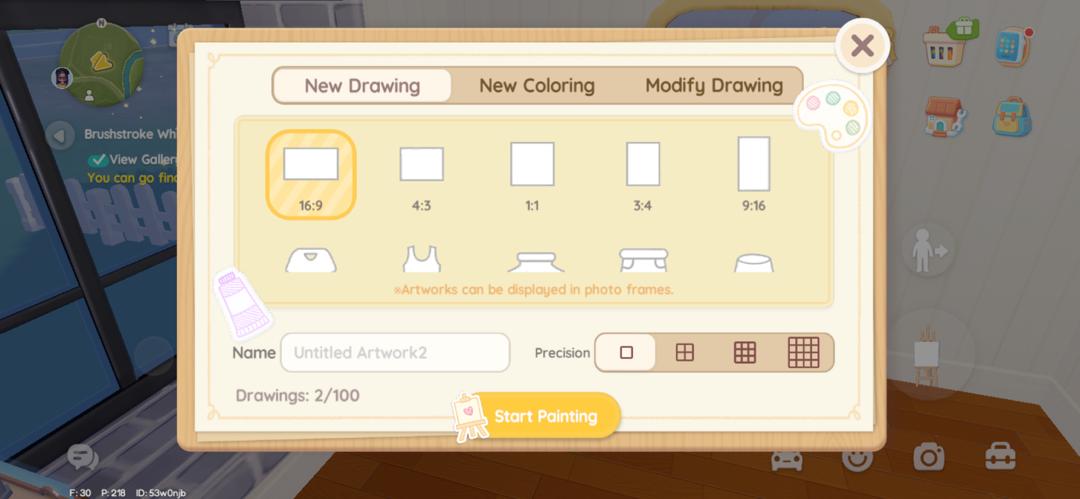
The Drawing Board includes several helpful tools:
- Adjust brush size for fine details or bold strokes.
- Paint bucket to fill large areas instantly.
- Stamp tool with pre-made designs, such as flowers and cute animals.
- Coloring pages for players who want structured designs.
Even if you are not confident in your artistic skills, the stamp tool and coloring pages allow you to create appealing designs with minimal effort. Once you finish a design, save it. That design can then be applied to clothes or furniture, depending on the template you used.
How to design and make Custom Clothes in Heartopia
To begin, you need to select a clothing template. Once you choose a template, click Start Painting Board and create your design for that item. After finishing the artwork, head to your workbench. Here, select the scissors icon, which opens the clothing crafting menu.
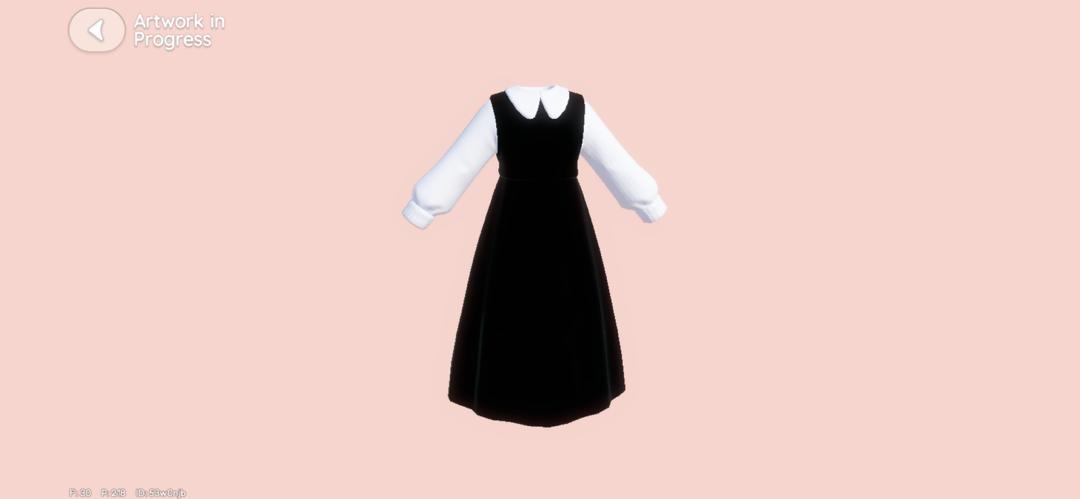
From this menu, you can view all available clothing options and apply your saved design to the selected garment. However, designing the outfit is not the final step. To complete the crafting process, you need a Tailoring Ticket.
You can obtain Tailoring Tickets in two ways:
- Completing quests that reward tickets
- Purchasing them for 80 Moonlight Crystals each
Once you use a Tailoring Ticket and finish crafting the outfit, you’re ready to put on some brand new threads. Simply visit your wardrobe, open the custom designs section, and equip your creation. And that’s all you need to do to create a custom outfit in Heartopia.
How to design and make Custom Furniture in Heartopia
To start designing your custom furniture, pick a furniture template to work with. After picking a template and completing your design, go to your workbench. Instead of the scissors icon, select the brush icon. This opens the furniture customization menu.

Before applying the design, make sure the furniture piece is either in your inventory or storage. If the item is missing, it won’t appear in the customization list. Next, select the furniture item you want to customize and choose your saved design.
To finalize the process, you must have a can of paint available. If you don’t have any paint, paint cans can be purchased from the General Store for 50 Moonlight Crystals. Once applied, your custom furniture becomes ready, and you can place it in your home.
So that’s it from our Heartopia Clothes and Furniture Guide, folks! Congratulations on making your first custom clothes and furniture. For more Heartopia guides, check our other guides below:
- Heartopia Dog Care Guide: How to unlock, Rewards, and more
- Heartopia Cat Care Guide: How to unlock, Rewards, and more
- Heartopia Insect Catching Guide and Insect Locations
- Heartopia Birdwatching Guide and Bird Locations
Did you find this Heartopia Clothes and Furniture Guide useful? Let us know in the comments below!
For more Mobile Gaming news and updates, join our WhatsApp Channel, Telegram Group, or Discord server. Also, follow us on Instagram, Twitter, and Google News for quick updates.
