


- There's more to Heartopia than just its fun hobbies. And exploring its little map with a vehicle is another highlight.
- So read our complete vehicle guides and learn how vehicles in Heartopia work, and exactly how to unlock each one.
Exploring Heartopia on foot sounds charming at first. However, once in a while, moving around the world that way feels exhausting. Traveling from the forest to the onsen, then back home, and later across town for an event can feel unnecessarily slow a lot of times. Thankfully, Heartopia solves this problem by introducing vehicles.
In this Heartopia Vehicle Guide, we’ll break down how to unlock vehicles, how to use and manage them, and most importantly, provide a complete list of all vehicles in Heartopia and how to get them. Also, read our Heartopia Beginners Guide, co-op guide, Heartopia Hobbies Guide, tips on unlocking Home Plots, and Heartopia Gold Guide for a smooth start. And our Heartopia Redeem Codes article for freebies in the game.
How to unlock and purchase vehicles in Heartopia
When you begin your journey in Heartopia, vehicles aren’t instantly available. Rather, you need to progress through the game a bit to get access to them. So early on, you’ll mostly explore on foot, slowly seeing the world and completing tutorial tasks.
Eventually, as you progress through the main story, you’ll reach the expanding your home plot quest for the first time. This moment acts as the gateway to vehicles. Once the task is completed and the expansion is done, Andrew, the game’s vehicle NPC, will appear outside your house.

After speaking with Andrew, the vehicles officially unlock. As a welcome bonus, you receive your first Green Scooter for free. From this point forward, Heartopia offers several ways to expand your collection.
You can acquire vehicles through Andrew’s Vehicle Shop, which sells vehicles for Gold or Wishing Stars. The Acorn Store is another place to get vehicles, and it offers premium vehicles for Heart Diamonds. Also, if you don’t mind dipping into your wallets, real-money purchases unlock special bonus vehicles.
How to use your vehicle in Heartopia
Once you own a vehicle, using it is simple. Tapping the vehicle icon in the bottom-right corner of the screen instantly spawns your currently selected ride, letting you hop on and head out without delay. However, things get more interesting as your garage grows. And our Heartopia Vehicle Guide is going to fill you in.
How to swap vehicles in Heartopia
As you collect multiple vehicles, you’ll likely want to switch between them depending on mood or purpose. For example, the starter scooter is perfect for solo travel, while sedans allow you to ride with your friends.

To change current vehicle:
- Long-press the vehicle icon in the bottom-right corner.
- A menu will appear showing all vehicles currently owned.
- Select the vehicle you want.
- Press Drive to spawn it.
This process is quick and simple, encouraging you to swap vehicles often rather than sticking to just one.
How to assign a main vehicle in Heartopia
If you have a favorite ride, you can set it as your default vehicle. This ensures that whenever you tap the vehicle icon, that specific vehicle appears automatically.

To do this:
- Long-press the vehicle icon.
- Select your preferred vehicle.
- Press the Default option.
From that point on, Heartopia remembers your choice, saving you time and clicks during daily play.
How to add a parking spot to your home in Heartopia
Vehicles don’t just exist for travel, they’re also part of your home’s aesthetic. And to properly store and display them, players will need a parking spot.

To add one:
- Enter Build Mode.
- Open the Furniture section.
- Scroll to the Misc. category and filter by vehicles.
- Select your vehicle to generate a parking spot.
- Place it anywhere on your lot and confirm the build.
Once placed, your vehicle will appear neatly parked, making your home feel more complete with a personal garage.
List of Vehicles in Heartopia and how to get them
There is a range of vehicles in Heartopia for you to get your hands on. And this variety ensures you’re not stuck with the same vehicle forever. But these vehicles aren’t free, and they cost currency to own.
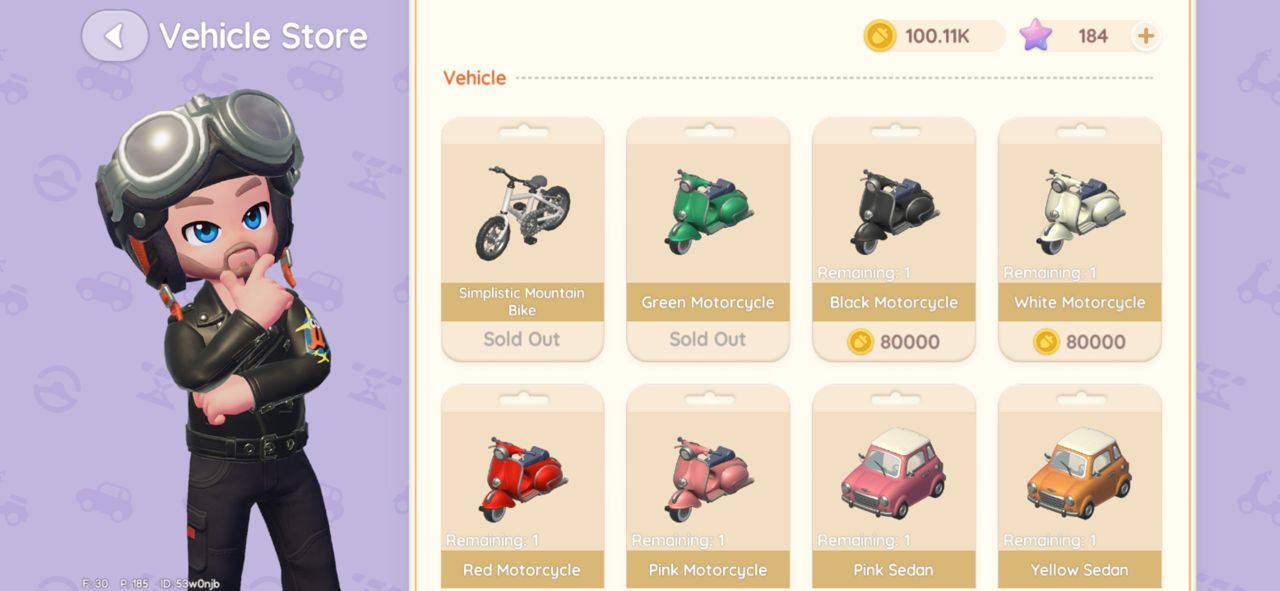
Below is the complete list of all currently available vehicles in Heartopia, along with their prices and acquisition methods.
| Vehicle Name | Price / How to Get |
|---|---|
| Simplistic Mountain Bike | 48 Wishing Stars (Vehicle Shop) |
| Green Motorcycle | Free (Story progression from Andrew) |
| Black Motorcycle | 80,000 Gold (Vehicle Shop) |
| White Motorcycle | 80,000 Gold (Vehicle Shop) |
| Red Motorcycle | 80,000 Gold (Vehicle Shop) |
| Pink Motorcycle | 80,000 Gold (Vehicle Shop) |
| Pink Sedan | 300 Wishing Stars (Vehicle Shop) |
| Yellow Sedan | 300 Wishing Stars (Vehicle Shop) |
| Blue Sedan | 300 Wishing Stars (Vehicle Shop) |
| Black Sedan | 300 Wishing Stars (Vehicle Shop) |
| White Sedan | Free (7-day login reward) |
| White Convertible | 750 Wishing Stars (Vehicle Shop) |
| Moonwards Gaze | 180 Heart Diamonds (Acorn Store) |
| Hot Chase | 1,680 Heart Diamonds (Acorn Store) |
| Matcha Chocolate | 2,800 Heart Diamonds (Acorn Store) |
| Neon Night | 2,800 Heart Diamonds (Acorn Store) |
| Elaina’s Glasses | 2,800 Heart Diamonds (Acorn Store) |
| Aurelia | 3,800 Heart Diamonds (Acorn Store) |
| Rainbow Motorcycle | Free with any real-money purchase |
| Starsea Motorcycle | Free after reaching 100,000 purchase points |
Final Thoughts
Vehicles in Heartopia make traveling across the world faster and smoother, while also giving you another way to showcase your personal style. Whether you’re cruising solo on a scooter, exploring with friends in a sedan, or flexing a premium ride in town, vehicles add personality and freedom to everyday gameplay.
And that’s it from our Heartopia Vehicle Guide. For more Heartopia guides, also check our other guides below:
- Heartopia Pink Bubble Locations for January 31st to February 6th, 2026
- Heartopia Rainbow Weather Guide: How to prepare and what to do during the Rainbow weather
- Heartopia Meteor Shower Guide: How to prepare for a Meteor Shower event
- How to build your dream home in Heartopia
Did you find this Heartopia Vehicle Guide useful? Let us know in the comments below!
For more Mobile Gaming news and updates, join our WhatsApp Channel, Telegram Group, or Discord server. Also, follow us on Instagram, Twitter, and Google News for quick updates.
