


Morikomori Life is a 3rd person casual simulation 3D game where you play to flourish and develop your countryside hometown. Developed by Realfun Studio, the game was recently released on both iOS and Android. In this Morikomori Life Beginners Guide, I’ll provide you with some useful tips to help you get started and improve your gaming experience.
If you are new to casual life simulation games like Morikomori Life, then this Guide is just the thing to help you get started. So let’s begin with the basics. Additionally, feel free to explore our redeem code article for some freebies.
Morikomori Life Gameplay Basics
Gameplay Overview
First, let’s start with the gameplay overview of Morikomori Life to help you get a clear idea of how this 3D simulation game works, including its simple yet creative storyline, village exploration, character customisation, and other brilliant features. The game begins with a casual-Ghibli style cutscene, where you, as the main character, are travelling on a train in a modern city.
While travelling, you reminisce about your peaceful childhood and realise that you miss the village. So, tired of the hustle and bustle of the city, you decide to go back to your late grandmother’s village, Komori, a beautiful rural village surrounded by sakura trees and very friendly neighbours.
Character Selection and Story Progression
After the cutscene ends, the game lets you choose between a male and a female character that you want to portray. It also features character customisation options such as adorable clothing, colourful hairstyles, and changeable facial features.
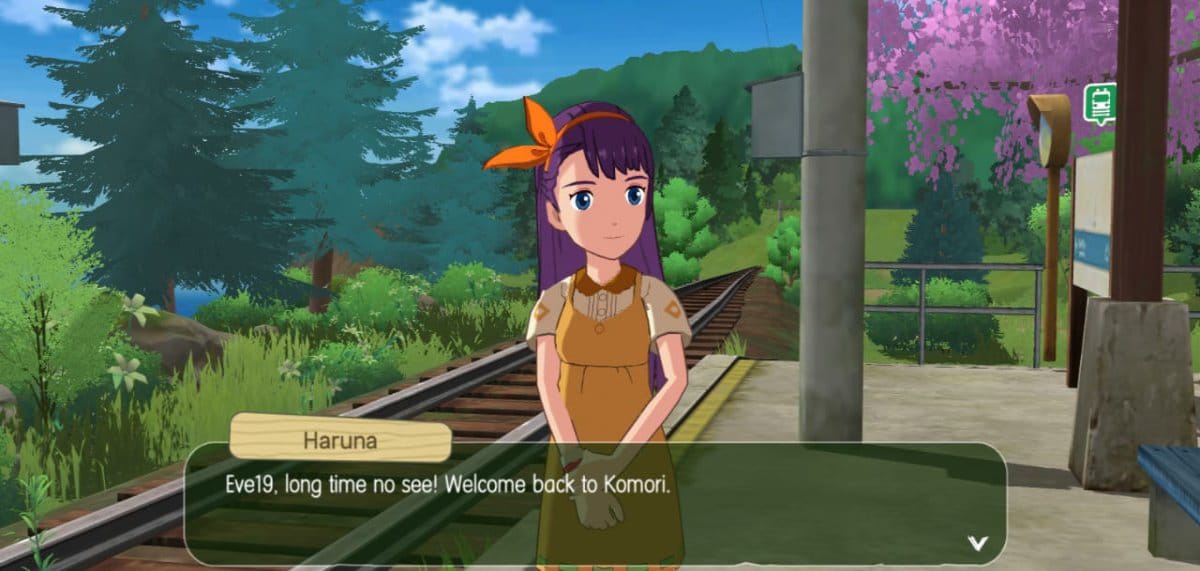
The game then proceeds with dialogue interactions between your character and Haruna (your childhood friend), who then takes you to meet the village chief. This becomes your first task inside Komori village.

After meeting the village chief, Masao, you are then given the task to go to your grandmother’s house, where you find the house and the courtyard in ruins. The game lets you explore the surroundings and the world map after you have completed certain tasks and levels. In the beginning, you can only go to the village, station, and your house, but later on, you get to go to the forest located near the village.
Understanding Game Controls and Features
Morikomori Life also has a global chatting system where you can chat with people from various countries. It is located on the upper-left side of the screen near the taskbar. You can move around with the help of on-screen controls pinpointed on the lower left side, and you can also change your viewpoint when you scroll right to left or vice versa on the phone screen.

Below the game screen, you will find the ‘bag’ where all of your tools, such as the sickle, axe, and pickaxe, and all other resources like softwood, brick stones, lapis lazuli, etc, are stored. On the right side of the screen, you have the fast run button and tool use button that you can press to use the above-mentioned tools for cleaning weeds, chopping wood, and breaking stones.
The map and the amount of your gold coin are also located on the uppermost right side of the screen. The game provides you with a cellphone where you gain the contact numbers of NPC characters, such as Haruna, Masao (the village chief), Genzou (the carpenter), Shimaga (the smith), etc., when you meet and complete their given tasks to chat.

It also provides you with a collection of character albums where you can collect NPC characters and read casual details about them. It also shows you the affinity level that you gain after interaction with characters.
The collection also includes titles and achievements. The cellphone and the album are located on the uppermost left side of the screen near your character profile and energy bar, with other elements of the game like rewards, prize pool, shop, and Ad remove.
Performing Daily Tasks and Mastering Tools in Morikomori Life
Tasks

Morikomori Life provides a list of various tasks such as chopping woods, cleaning weeds, breaking stones, repairing your home’s old door, throwing old and shabby furnitures in the storage, repairing the floors and the staircase, cooking food, farming vegetables, decoring the courtyard and home, exploring the world to meet new people, building resource, etc. to keep the game engaging and interesting for you.
Notice Board

The noticeboard is a feature of the game where you can either upgrade or manage your home. Upgrading makes the home more spacious and unlocks various other rooms. As mentioned above, the notice board also lets you invite friends to your home and visit theirs too.
Carpentry Table, Smithing Table, and Assembly Table
After chopping wood, you cannot use it directly for repairing or building. First, you will have to go to the carpentry table located near your home and make softwood planks from softwood. The softwood planks are then used for repairing stuff and making quality lumber. Just like how you can’t use chopped wood directly, you also cannot use stones to make walls, statues, or a cooking stone table directly.

You will have to go to the smithery, which is also located near the carpentry table, first, and then create stone bricks, which later help in making stone stuff. On the assembly table, you can create different types of furniture from wood and stone to decorate your home. It also assembles things from rare stones and gems.
Exploring the World Map

Morikomori Life offers a vast world for exploration, filled with new elements and mesmerising graphics. The map has several locations, such as the Dawn Woods, White Dew Ridge, Slumbering Mine, Dusky Woods, Sacred Mount, Meowland, etc.
Morikomori Life Beginners Guide: Tips and Tricks
If you are playing Morikomori Life for the first time, then pay attention to the tips that I will share with you below-
- The energy bar depletes faster when you are doing tasks for story progression. So, keep an eye on the energy bar and use it wisely.
- While exploring the woods, don’t go too far without proper equipment and food.
- Interact and gift more with the NPCs to increase affinity levels with them.
- Complete daily tasks properly to gain more coins and resources.
Final Thoughts
Honestly, Morikomori Life gave me more of the Genshin Impact vibe without any fantasy or action elements. The graphics and the map both felt familiar. If you are into simple and casual life simulation games, then this might be what you have been looking for.
Check our other coverage on beginner’s guides below:
- Stella Sora Beginners’ Guide and Tips
- Disney Magic Match 3D Beginners’ Guide and Tips
- THE KING OF FIGHTERS AFK Beginners Guide and Tips
- Seven Knights Re:BIRTH Beginners Guide and Tips
- Dragon Ball Gekishin Squadra Beginners’ Guide and Tips
For more Mobile Gaming news and updates, join our WhatsApp group, Telegram Group, or Discord server. Also, follow us on Instagram, Twitter, and Google News for quick updates.
